





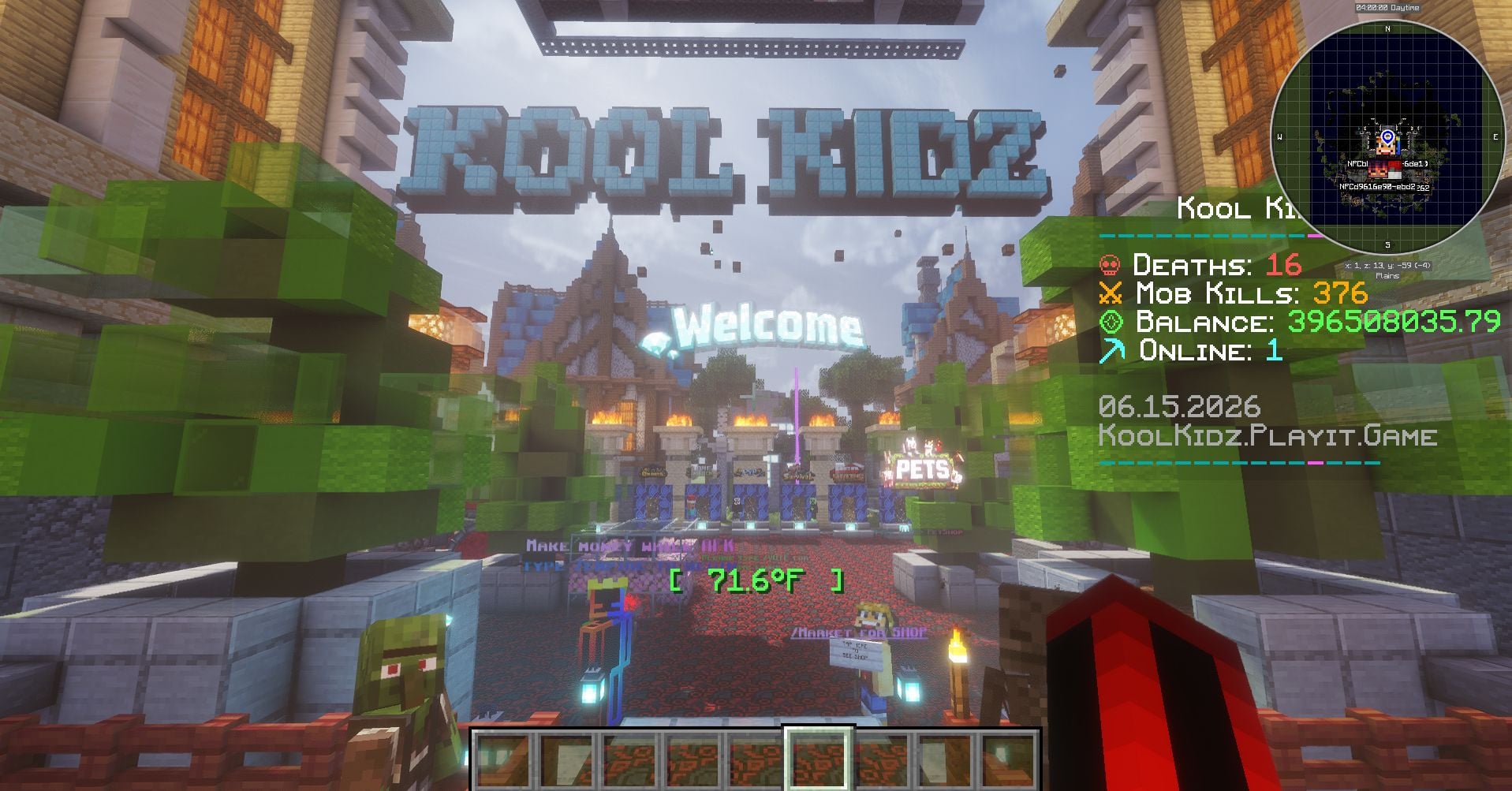
Step into KOOL KIDZ, where every login drops you into a world buzzing with adventure, survival challenges, PvP chaos, and loot that hits different. This isn’t your average server — it’s a full‑on playground built for players who want action, style, and nonstop fun.
✨ What Makes KOOL KIDZ Special
🌍 Adventure Zones — Explore custom worlds, hidden dungeons, and quests that reward the bold.
🛡 Survival With Flavor — Build, grind, and thrive while facing unique challenges and surprises.
⚔ PvP Arenas — Fast, skill‑based combat where only the sharpest players walk out victorious.
🎁 Loot Crates — Unlock rare gear, exclusive cosmetics, and powerful items that level up your journey.
👑 Community Vibes — Chill players, active staff, and events that keep the world feeling alive.
💥 Join the fun. Claim your spot. Become a KOOL KID.
IP: koolkidz.playit.game
What kind of Minecraft Server is 𝘒𝘒𝘡 𝘚𝘔𝘗/𝘗𝘝𝘗?
𝘒𝘒𝘡 𝘚𝘔𝘗/𝘗𝘝𝘗 is a Minecraft Semi Vanilla Server that caters to players using both Java and Bedrock editions of the game. The server aims to provide a friendly and welcoming environment for players to enjoy a balanced and engaging Survival, Semi Vanilla experience.
- Java Server IP: koolkidz.playit.game
- Bedrock Server IP: koolkidz.playit.game | Bedrock Port: 19132
- Minecraft Version: The server operates on version 26.1.2
Types of Games and Gameplay on 𝘒𝘒𝘡 𝘚𝘔𝘗/𝘗𝘝𝘗?
Minecraft servers offer a diverse range of game modes and gameplay types, which is what sets them apart from one another. 𝘒𝘒𝘡 𝘚𝘔𝘗/𝘗𝘝𝘗 is a Minecraft server that offers several types of games and gameplay, including Bedwars, Parkour, LifeSteal, OneBlock, Roleplay, PVP, PVE, Land Claim, CityBuild modes.
Server software used to run 𝘒𝘒𝘡 𝘚𝘔𝘗/𝘗𝘝𝘗?
Using custom server software provides additional features, customization options, and plugin support compared to the original Minecraft server jar. This server has registered their server to use the following server software: Spigot
How do I join the 𝘒𝘒𝘡 𝘚𝘔𝘗/𝘗𝘝𝘗 server?
Join with Minecraft Java edition
- Click on the Java IP here to copy it: koolkidz.playit.game
- Open Minecraft and click the Multiplayer tab and click Add Server
- Paste the IP into the Add Server option. Click Done
- Click Join and enjoy playing on 𝘒𝘒𝘡 𝘚𝘔𝘗/𝘗𝘝𝘗
Join with Minecraft Bedrock / Pocket Edition (MCPE)
- Click on the link here to: Add 𝘒𝘒𝘡 𝘚𝘔𝘗/𝘗𝘝𝘗 to Minecraft Pocket Edition
- Click Play and enjoy playing on 𝘒𝘒𝘡 𝘚𝘔𝘗/𝘗𝘝𝘗 Bedrock Edition.
- If the above does not work, then Copy this IP and Port individually. koolkidz.playit.game Port: 19132
- Open Minecraft Pocket Edition and click the Play button
- Open the Servers tab and click on the Add Server option
- Paste the IP into the Server Address field, and the Port in the Port field
- Click Play and enjoy playing on 𝘒𝘒𝘡 𝘚𝘔𝘗/𝘗𝘝𝘗 Bedrock Edition.
