

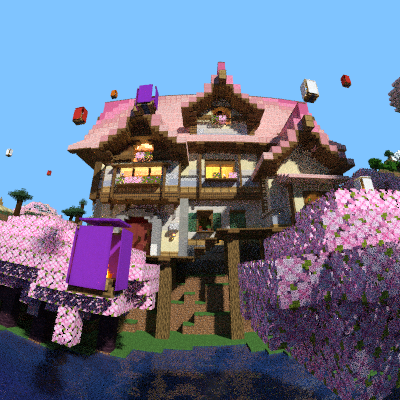
This is a laidback roleplay server where you can feel free to express yourself as a Queen or a Knight! Queens govern the land, while Knights enforce and protect.
When you first join, you will be asked to select a rank path: to Queen or Knight. You will be given a rank, and a starter kit. You can choose to make your own town/village or help others.
How do you know if M'Lady needs help? Well, there are tags which indicate their intentions. A Princess might be open for others to join her flock. She will have the tag [OPEN] next to her name, as in OPEN FOR NEW HELPERS!
How do you know if squires and Knights are occupied by a queen's demands? The tag will show as [BOUND], or [OFF-DUTY], as in YOUR DUTY IS BOUND TO A SPECIFIC LADY/QUEEN. A knight might be OFF-DUTY forever, living as a rogue. This is their choice.
So, whether you want to just see what this server offers, or if you are just curious, don't hesitate to stop by! We are welcoming of everyone over age 18.
Jobs, Economy (in-game currency), Shop, Claims, Tags, Votes, and more!
All Queens need a dutiful knight; will you be the one?
We are also looking for a staff member! Please reach out.
Join the discord for more information
https://discord.gg/xB6TdgM6
General rules:
must be over 18 to join
English is the main language, although Polish is also allowed.
Join the discord for more info ;)
What kind of Minecraft Server is QueendomSMP?
QueendomSMP is a Minecraft Survival Server that specifically serves players using the Java edition of the game. The server aims to provide a friendly and welcoming environment for players to enjoy a balanced and engaging Survival experience.
- Java Server IP: 203.16.163.48:26917
- Minecraft Version: The server operates on version 1.21.4
Types of Games and Gameplay on QueendomSMP?
Minecraft servers offer a diverse range of game modes and gameplay types, which is what sets them apart from one another. QueendomSMP is a Minecraft server that offers several types of games and gameplay, including Roleplay, Land Claim, Economy modes.
Server software used to run QueendomSMP?
Using custom server software provides additional features, customization options, and plugin support compared to the original Minecraft server jar. This server has registered their server to use the following server software: Spigot
Additional plugins / mods installed on server
Essentials, Dynmap, EconomyShopGUI, EssentialsDiscord, ExcellentCrates, GSit, PlaceholderAPI, LuckPerms, Vault, WorldGuard, CoreProtect
How do I join the QueendomSMP server?
Join with Minecraft Java edition
- Click on the Java IP here to copy it: 203.16.163.48:26917
- Open Minecraft and click the Multiplayer tab and click Add Server
- Paste the IP into the Add Server option. Click Done
- Click Join and enjoy playing on QueendomSMP
